TABLE OF CONTENTS
The “Rephrase My Speech” feature helps you improve your speaking by rewriting your speech in a more natural, fluent, and accurate way using AI.
This feature is available after you complete a recording in Speech Analyzer Mobile.
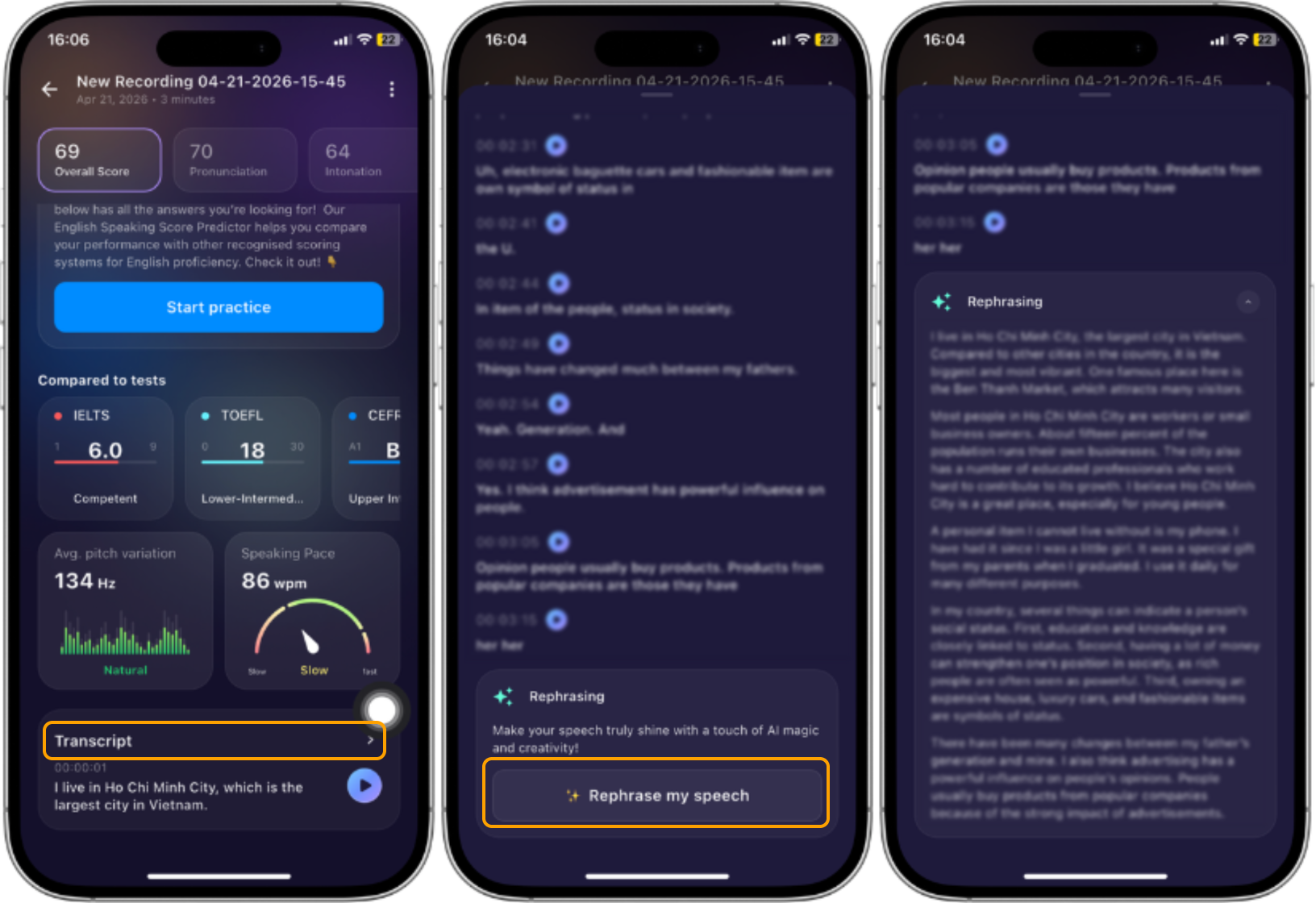
Where to find this function:
- Complete a recording in Speech Analyzer
- Go to the results screen or tap “View Analysis”
- Scroll down to open the "Transcript"
- Scroll down and then tap ✨ “Rephrase my speech”
How it works
AI analyzes your original speech
- The system rewrites your speech into a more natural version
- Grammar, sentence structure, and clarity are improved
- Filler words (e.g., “um”, “uh”) may be reduced or removed
Was this article helpful?
That’s Great!
Thank you for your feedback
Sorry! We couldn't be helpful
Thank you for your feedback
Feedback sent
We appreciate your effort and will try to fix the article